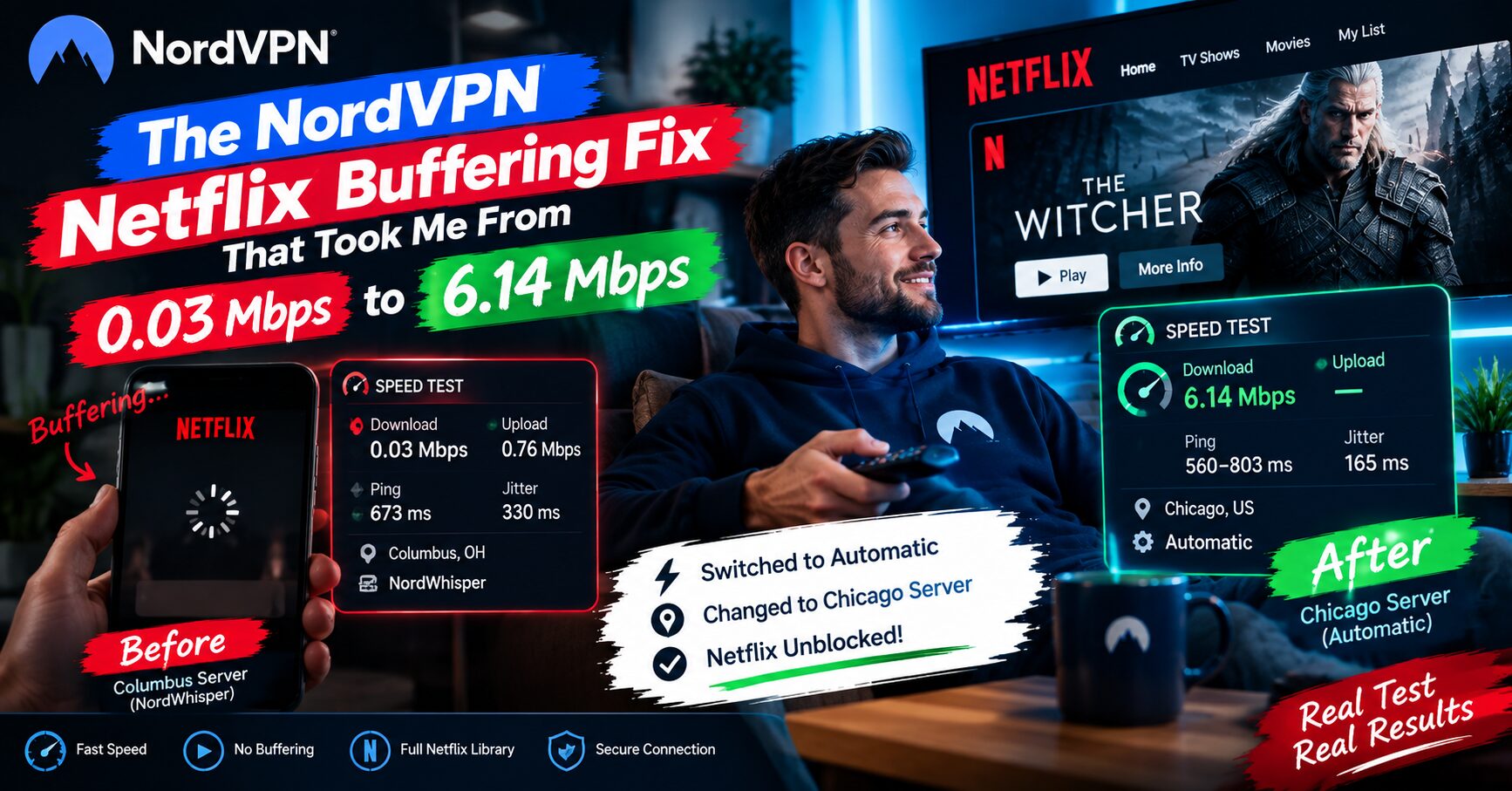
0.03 Mbps. That’s what NordVPN’s Columbus server gave me on a speed test. Not slow, basically nothing, and that’s why Netflix sat on a spinning wheel and never started the video.
NordVPN Netflix Buffering Fix Here’s what the numbers were and what I changed.
Quick answer
Switching from the Columbus server to Chicago, and from the NordWhisper protocol to Automatic, took my download speed from 0.03 Mbps to 6.14 Mbps. I changed both at the same time, so I can’t say which one did more of the work. I haven’t re-tested Netflix on Chicago yet, so treat this as a verified speed fix, not a verified NordVPN Netflix Buffering Fix.
Tested on: my own Android phone, NordVPN app, same network and session.
What I started with
Before connecting, I checked the settings. The protocol was set to NordWhisper, not Automatic. According to NordVPN, NordWhisper is built for networks that block or restrict VPN traffic, and NordLynx is the faster option on regular networks. So it’s a good setting to have available, but it isn’t automatically the fastest pick.

Columbus took over three minutes to connect
I picked Columbus. It sat on “Loading IP” and the app’s timer showed 3:14 before it finally connected. Other servers I’ve tested connect in a few seconds, so that was already a bad sign.

Then the speed test
| Metric | Result |
|---|---|
| Download | 0.03 Mbps |
| Upload | 0.76 Mbps |
| Ping | 673 ms |
| Jitter | 330 ms |
| Server | Columbus, OH |

0.03 Mbps is about 30 kbps, slower than old dial-up. Nothing was going to load on that.
Netflix on that connection
I opened Netflix on the same connection and pressed play. I got a black screen with a spinning wheel that never turned into video. No proxy error and no VPN-detected message, just a stream that couldn’t pull enough bandwidth to start.

That’s the part people miss. A slow VPN doesn’t always show an error. It can just look like Netflix is broken.
What I changed
I left Columbus, connected to Chicago, and switched the protocol from NordWhisper to Automatic at nearly the same time. Chicago connected in 1 minute 28 seconds. Still not instant, but far better than the three-plus minute stall.

Chicago speed test — this is the number that matters
Same phone, same network, different server and protocol.
| Metric | Columbus (NordWhisper) | Chicago (Automatic) |
|---|---|---|
| Download | 0.03 Mbps | 6.14 Mbps |
| Upload | 0.76 Mbps | — |
| Ping | 673 ms | 560–803 ms |
| Jitter | 330 ms | 165 ms |

Download went up more than 200 times and jitter was cut in half. One honest note: ping did not really improve, it stayed high at 560-803 ms. If your video starts but feels laggy when you skip around, that’s why.
[FILL IN: How many speed tests did you run on each server? One run each is a snapshot, so say so.]
What I’d try, in this order
- Switch the protocol to Automatic if you’re on NordWhisper or another manual choice, and let the app pick.
- Try a different city if a server takes minutes to connect or tests under 1 Mbps. That points at the server, not your phone.
- Run a speed test before you wait out a buffering screen. Thirty seconds tells you if the connection is broken.
- Don’t blame Netflix first. A wheel that never stops spinning is usually a bandwidth problem underneath.
One bad server isn’t the whole story
This doesn’t mean NordVPN is slow in general. It was one city, one protocol and one day, and server load changes. It does show that a rough connection is worth checking instead of putting up with. The fix took me under two minutes.
FAQ
Why is Netflix buffering on NordVPN? In my test the cause was a very slow server: 0.03 Mbps on Columbus. Netflix showed no error, only a spinner. A quick speed test shows whether the connection is the problem.
Is 0.03 Mbps normal for a VPN? No. It’s far below what a working VPN server gives you, even with normal VPN overhead. It points to a problem with that server or connection at that moment.
Should I change the protocol or the server first? Protocol first, because it’s quicker to try. If it’s still slow, move to a different nearby city. I changed both at once, so I can’t tell you which mattered more.
What is NordWhisper? A NordVPN protocol made for networks that restrict VPN traffic. On a normal network, Automatic or NordLynx may be a better fit.
Does buffering always mean a VPN problem? No. But if Netflix hangs on a spinner with no error message, check the speed first.
Real test on my own Android phone: Columbus on NordWhisper vs Chicago on Automatic, same network and session. Netflix on Chicago: [FILL IN: result, or “retest pending”]. Results vary by device, network and time of day.
Related: ExpressVPN Los Angeles Netflix Test: Verified Working (2026) · NordVPN stuck on connecting