I wanted to know if switching NordVPN’s built-in DNS to Cloudflare’s 1.1.1.1 would change anything I’d actually notice. So I ran this NordVPN Cloudflare DNS test on my Android phone. I connected to the Atlanta server, ran a DNS leak test and a speed test, changed the DNS in the app, then ran both again.
Neither setup sent my lookups to my own provider. The speed numbers jumped around, but I don’t think DNS is the reason. I’ll explain why below.
Short Version
- Leaks: my mobile provider never showed up with either DNS. dnsleaktest.com’s strict rule would still flag Cloudflare, since it isn’t NordVPN’s own resolver.
- Default NordVPN DNS: 11 servers, all listed under Clouvider in Atlanta.
- Cloudflare (1.1.1.1): 2 servers, both listed under Cloudflare in Atlanta.
- Speed: download was higher on the Cloudflare run. With one run each on mobile data, I can’t say DNS did that.
Test Details
| Device | Infinix Android phone |
| VPN | NordVPN Android app, Atlanta server (United States #11581) |
| Network | Mobile data |
| Tools | dnsleaktest.com (six query rounds), Speedtest app |
| Public IP, both runs | 62.106.78.97 |
| Test date | Not provided |
How I Tested
The app and the test site showed the same public IP, 62.106.78.97, so the test was going through the VPN. I used dnsleaktest.com for the leaks and the Speedtest app for speed.

I ran everything on the default DNS first. Then I switched on Custom DNS in the NordVPN app, typed in 1.1.1.1, and repeated the same tests. The whole thing took under ten minutes.

Custom DNS in the NordVPN Android app, with 1.1.1.1 added.
The app shows a yellow warning that third-party DNS may limit website availability. If pages stop loading after you change it, our NordVPN DNS not resolving fix walks through what to check.
Default NordVPN DNS Result
On the default DNS the test found 11 servers over six rounds. Every one was listed under Clouvider in Atlanta, United States. They sit in the same 62.106.78.x range as the VPN server I was on, and my own public IP, 62.106.78.97, is one of the addresses in the list. That fits with NordVPN running its own resolvers on its server network. None of them belonged to my mobile provider, so there was no leak.
Our earlier NordVPN DNS leak test on an Atlanta server showed a similar pattern, with resolvers listed under NordVPN and Clouvider.

Cloudflare DNS Result
After the switch the test found just 2 servers: 104.22.120.50 and 104.22.120.51, both listed under Cloudflare in Atlanta. All six rounds returned the same two, and my public IP stayed at 62.106.78.97, so the VPN connection itself hadn’t changed. Again, nothing from my mobile provider.
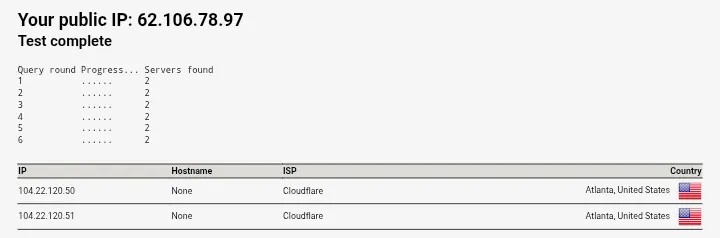
dnsleaktest.com says any listed server that isn’t provided by your VPN counts as a DNS leak. Read strictly, NordVPN Cloudflare gets flagged. I’d call it a choice, not a leak. My lookups went to a resolver I picked, not to my ISP. What changes is who you trust with them, NordVPN or Cloudflare.
The Numbers
| Default NordVPN DNS | Cloudflare 1.1.1.1 | |
|---|---|---|
| DNS servers found | 11 | 2 |
| Listed owner | Clouvider (Atlanta) | Cloudflare (Atlanta) |
| My real ISP visible | No | No |
| Public IP | 62.106.78.97 | 62.106.78.97 |
| Download | 1.75 MB/s (about 14 Mbps) | 5.41 MB/s (about 43 Mbps) |
| Ping readings (ms) | 343 / 825 / 1158 | 521 / 952 / 1998 |
| Jitter | 105 ms | 78 ms |
| Upload | Not captured | Not captured |
| Speedtest server | Point Broadband, Atlanta | Clouvider Ltd, Atlanta |
Why the Speed Numbers Don’t Prove Much
The Cloudflare run downloaded at 5.41 MB/s against 1.75 MB/s on the default. That looks like a big win, but I wouldn’t give DNS the credit. Speedtest picked a different server each time. I was on mobile data. I ran each setup once. The upload test hadn’t finished in either screenshot, so I have no upload numbers.

Latency went the other way. All three ping readings were higher on the Cloudflare run, while jitter was lower. DNS changes how fast a site’s name gets looked up, not how fast a download runs once it starts. To call either setup faster, I’d want repeated runs against the same test server.
Should You Switch?
If leak protection is your goal, neither setup sent my lookups to my provider, so this test gives you no reason to switch. I’d stay on the default unless you specifically want Cloudflare as your resolver. The app’s own warning about website availability is another reason to leave it alone. If sites do break, we have a separate guide on NordVPN custom DNS not working.
How to Set Cloudflare DNS in the NordVPN Android App
- Open the NordVPN app, go to the Profile tab and open Settings.
- Find Custom DNS and switch on “Use custom DNS”.
- Enter 1.1.1.1 in the DNS server field and add it.
- Run the leak test again. If the server list hasn’t changed, reconnect to your server and retest.
To go back, switch “Use custom DNS” off.
What This Test Doesn’t Cover
One server, one run each, mobile data. I didn’t repeat either test, and I have no upload speeds. Another server or network could show different resolvers.
FAQ
Does using Cloudflare DNS with NordVPN cause a DNS leak? Not to my provider. The two servers listed were Cloudflare’s, and my mobile provider’s servers never showed up. Some leak tests treat any server outside the VPN’s network as a leak, so look at who owns the servers instead of trusting one label.
Does Cloudflare DNS make NordVPN faster? I can’t tell from one run per setup. My download was higher on the Cloudflare run, but the test servers were different and mobile speeds swing a lot.
Why did the test show only 2 servers with Cloudflare? The lookups went through 2 Cloudflare addresses instead of the 11 resolvers on the default setup. A shorter list isn’t a problem on its own. What matters is who owns the servers.
How do I switch back to NordVPN’s default DNS? Open Settings, find Custom DNS, and switch “Use custom DNS” off.
Related: NordVPN DNS Protection: Real Des Moines Leak Test (2026)