ExpressVPN DNS Servers Not Working: Same complaint, different app, same problem with the complaint itself — nobody says which server. We already know ExpressVPN doesn’t even give you a DNS setting to touch, so if something’s actually failing, it has to be the one DNS path the app runs automatically, on whichever server you happen to land on. That’s testable. So for this ExpressVPN DNS servers not working test, I connected to two servers on two different continents, minutes apart, and watched exactly what happened.
Why this test is different from the NordVPN version
NordVPN gave us a Default-vs-Custom toggle to compare. ExpressVPN doesn’t — there’s nothing to switch, no setting to break. Which actually narrows the question in a useful way: if ExpressVPN DNS servers nor working were failing, it wouldn’t be a settings problem, it would be an infrastructure problem, and infrastructure problems show up differently depending on which server you’re touching. Test one server and you’ve learned nothing about the rest. Test two, on opposite sides of the Atlantic, and a pattern either shows up or it doesn’t.
1:42 PM — Connect to UK, Docklands

Protected, UK IP address on screen, sitting on the map right where it should be. Then straight to a real site — not a static test page, a working freelance marketplace homepage with search functionality, category buttons, and an embedded profile image, the kind of page with enough moving parts to actually expose a DNS problem if one existed.

Full page. Search bar rendered, category buttons all present, the little animated mascot icon in the corner loaded from its own resource. Every piece of that page had to resolve correctly for it to look like this.
1:43 PM — Disconnect, reconnect to USA, Dallas
A minute later, different server, different continent entirely.
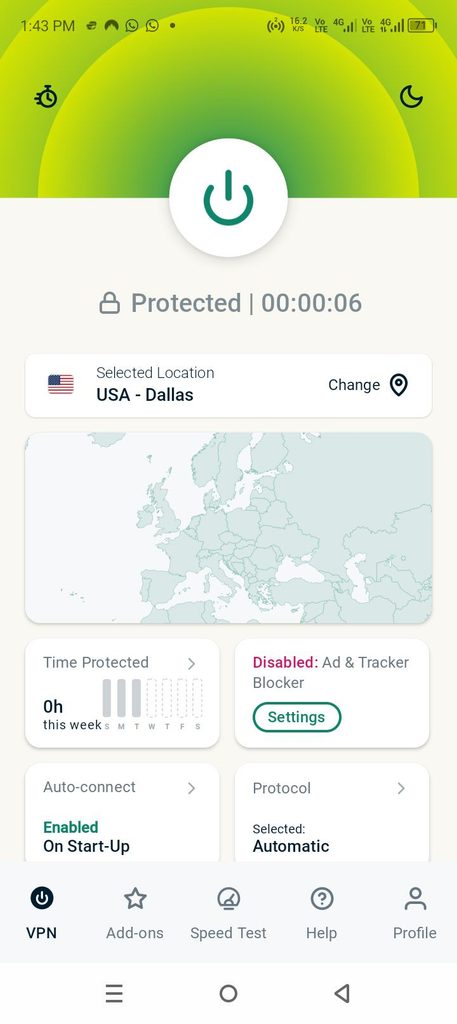
Same app, same automatic DNS behavior, now routed through Texas instead of London. Same site again — this time landing on a deeper page instead of the homepage, which matters, because a subpage pulls different resources than the front door does.

Loaded completely — headline, description text, and a cookie consent banner actively rendering on top of it. That banner isn’t decorative. It’s a script that has to load, execute, and inject itself into the page in real time. If DNS resolution had been struggling on this server, that’s exactly the kind of dynamic element that stalls or never appears at all.
ExpressVPN DNS Servers Not Working: What Two Timestamps Actually Prove
1:42 PM, UK, full page. 1:43 PM, US, full page, plus a live script executing correctly on top of it. Different continent, different city, different page on the same site, one minute apart — and neither one hesitated.
That one-minute gap matters more than it looks like at first glance. This wasn’t two tests run on different days under different network conditions, giving either one room to get lucky. It was back to back, same phone, same underlying connection, only the VPN server changing in between. If ExpressVPN DNS servers not working handling were inconsistent across its infrastructure, a same-session, minute-apart test is exactly where that inconsistency should have shown up. It didn’t.
What’s actually behind most of these search results
Since there’s no setting to misconfigure here, the usual suspects shift slightly:
- One server, having a bad five minutes. Even solid infrastructure has moments — a specific node under load at a specific time can produce a real, temporary failure that has nothing to do with every other server.
- The destination site pushing back, not the DNS. Plenty of sites detect and throttle VPN ranges specifically. From the user’s side that looks identical to a DNS failure, but the fault sits with the site, not ExpressVPN.
- Mistaking “slow” for “broken.” A page that limps in after several seconds instead of loading instantly still counts as working — it’s just a bad connection moment, and that gets misreported as a dead DNS server constantly.
- A real issue from months ago, still getting found today. Search results don’t expire when a problem gets fixed. Old threads keep answering new searches long after they stopped being accurate.
How to run this yourself
- Connect to any ExpressVPN server and load a real, resource-heavy site — not a blank page, something with images, buttons, and at least one dynamic element like a cookie banner
- Note the exact time and what loaded
- Disconnect, pick a server on a different continent, and repeat the same test on the same site
- Compare both — not just whether the page appeared, but whether everything on it did
Two clean results, minutes apart, on different continents, is a far stronger answer than one lucky page load — and a much more useful thing to report than “it’s not working” if your own test comes back differently.
Quick answers
Are ExpressVPN DNS Servers Not Working or broken?
Not in this test. UK and US servers, one minute apart, both resolved a full page including a live dynamic script, with nothing failing on either.
ExpressVPN doesn’t have a DNS settings toggle — so what exactly was tested here?
The automatic DNS resolution the app runs by default on each server, since that’s the only DNS path that exists in the app at all. Testing two different servers checks whether that automatic behavior holds up consistently across ExpressVPN’s infrastructure.
Why does testing a subpage with a cookie banner matter more than a homepage?
A cookie banner is an active script, not static content — it has to load and execute correctly in real time. That’s a more demanding proof of working DNS than a page simply appearing on screen.
What should I actually check if my own connection seems broken?
Confirm it’s not just one specific server or one specific site by testing a second server and a second destination. If the problem follows you across both, that’s a real, reportable issue. If it doesn’t, you’ve likely just caught a temporary hiccup.
Related: see our ExpressVPN DNS settings not working explainer, ExpressVPN DNS leak test, and the NordVPN version of this same two-server test for the cross-brand comparison.