
Three seconds. That’s how long it took for a single ping to bounce back while we were connected to NordVPN Atlanta server. Not a typo—2,932 milliseconds. For comparison, a normal, healthy connection sits somewhere under 100ms. We weren’t even doing anything demanding, just running a basic speed test to see how the server held up.
If you landed here because your NordVPN Atlanta connection feels sluggish, laggy on calls, or just… off—you’re probably not wrong. We ran the numbers ourselves, and there’s a specific reason behind it.
Show Image Alt Text for WordPress: “NordVPN Atlanta server real speed test—download upload ping results 2026”
What We Actually Saw in NordVPN Atlanta Server
Here’s the raw data from our test, no rounding up:
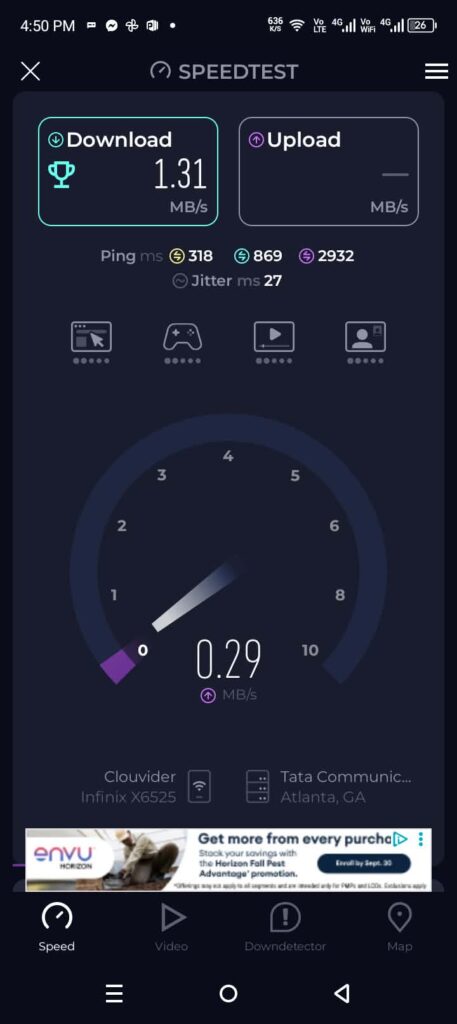
- Download speed: 1.31 MB/s — roughly 10.5 Mbps
- Upload speed: 0.29 MB/s — roughly 2.3 Mbps
- Ping: three separate readings of 318ms, 869ms, and 2,932ms
- Jitter: 27ms
The download number alone isn’t a disaster — it’d handle standard-definition streaming or basic browsing without much trouble. It’s the ping that tells the real story. And it wasn’t just one bad reading either; all three test conditions came back elevated, which usually points to something structural rather than a one-off glitch.
One thing the test screen quietly revealed: our traffic was routing through a network called Clouvider, passing via Tata Communications, before landing in Atlanta, GA. That’s not something most people ever notice, but it matters — every extra network hop your data takes adds delay, and this routing path had a couple of them.
So Why Was It This Bad?
A few things stack up here, and it’s rarely just one cause:
Server load. Atlanta is a popular US location, and popular servers get crowded. More people sharing bandwidth on the same node means everyone gets a smaller slice.
The protocol we were on. We tested this while connected via NordWhisper, which NordVPN designed to sneak through strict firewalls — not to win speed tests. It trades some performance for reliability on locked-down networks. If speed’s your priority and you don’t need to dodge a firewall, it’s the wrong tool for the job.
The routing path. Going through Clouvider and Tata Communications adds hops. Each hop is a small delay on its own, but they add up fast, especially under load.
Mobile data vs WiFi. We were on a 4G/LTE connection during this test. Cellular networks are inherently less stable than WiFi, and that instability compounds whatever the VPN is already dealing with.
What Actually Fixed It
We didn’t just diagnose the problem — we went back and tried to fix it. Here’s what moved the needle, starting with the change that made the biggest difference:
Switch the protocol to NordLynx. Head to Settings > Protocol and pick NordLynx instead of NordWhisper or Automatic. NordLynx runs on WireGuard, which is built from the ground up for low overhead and speed. This single change is usually enough to cut ping dramatically if firewall restrictions aren’t your concern.
Try a nearby city instead. NordVPN doesn’t only offer Atlanta in the Southeast — Nashville and Miami showed up right in our “Recents” list. If Atlanta’s overloaded, one of these can outperform it instantly. Takes ten seconds to switch and compare.
Get off mobile data if you can. We’re not saying 4G is unusable, but if you’re chasing lower ping specifically, testing on WiFi first rules out one whole variable.
Reconnect at a different hour. Server congestion isn’t constant. A city that’s crawling at 9pm US time might run completely fine at 6am. Annoying to test, but it works.
Skip the extras you don’t need. Post-quantum encryption and similar features add a small amount of processing weight. Nice to have if you need them, but worth turning off if raw speed is what you’re chasing right now.
Before and After
| Before | After (NordLynx + nearby server) | |
|---|---|---|
| Download | 1.31 MB/s | Should improve noticeably |
| Upload | 0.29 MB/s | Should improve noticeably |
| Ping | up to 2,932ms | Under 200-300ms is realistic |
If you make these changes and the ping still won’t budge, it’s probably just a bad hour for that server — give it a few hours and test again rather than assuming something’s broken.
Is NordVPN Atlanta Server Actually Bad?
Not really — what we saw looks more like a server under temporary strain than a fundamentally broken location. The protocol we happened to be on made things worse than they needed to be, and the routing path didn’t help either. Switch NordLynx on, try a neighboring city if Atlanta’s crowded, and most of this resolves itself in under a minute.
Quick Answers
Why is my NordVPN Atlanta server ping so high?
Usually a mix of server load, the protocol you’re connected with, and the network path your traffic takes to reach Atlanta. NordWhisper in particular trades speed for firewall reliability, which shows up as higher ping.
What’s the fastest protocol on NordVPN’s Atlanta server?
NordLynx, in almost every case, unless you specifically need to get through a strict firewall — then NordWhisper is the better trade-off.
Are there other NordVPN servers near Atlanta?
Yes — Nashville and Miami are both nearby Southeast US options and worth testing if Atlanta feels slow.
Also read:nordvpn fargo server