Real Test: August 6, 2026 · USA – New York Server · Lightway-UDP
If you’re on ExpressVPN connected to a USA server and Netflix just keeps spinning, I get it. It’s super frustrating. The app says “Protected” but Netflix won’t even load the home page.
I just ran this exact test on the ExpressVPN USA – New York server. Here’s what I found, and more importantly, how to fix it.
My Test Setup

Server: USA – New York
VPN IP: 45.8.19.242
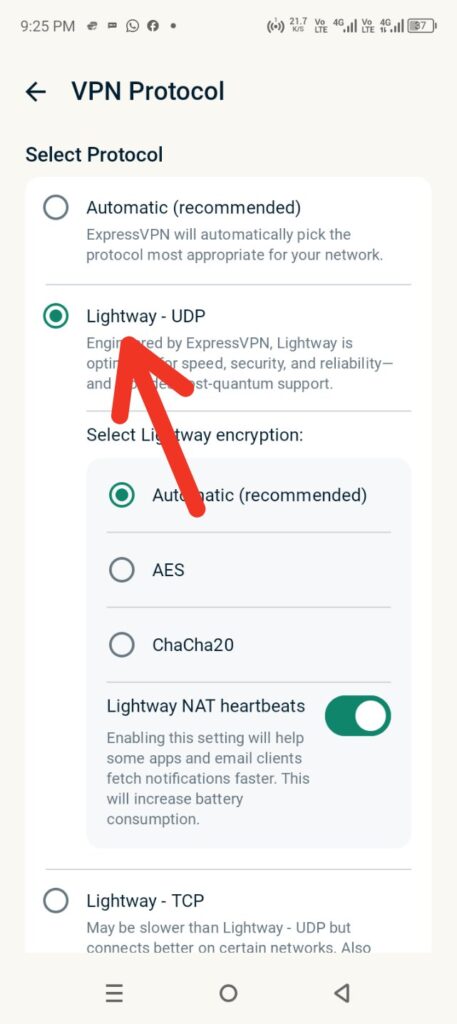
Protocol: Lightway – UDP
Connection: 4G Mobile
The VPN connected in 20 seconds. No issues there. The problem started when I opened Netflix.
Why Netflix Was Stuck Loading

There are 2 main reasons this happens with USA servers:
1. The Ping Was Insane
Look at these numbers from my speed test:
| Metric | My Result | What It Should Be |
|---|---|---|
| Download Speed | 1.34 MB/s | 3+ MB/s |
| Idle Ping | 352ms | 20-100ms |
| Download Ping | 2772ms | 50-150ms |
| Jitter | 98ms | <30ms |
A ping of 2772ms is the killer here. Netflix needs quick responses to load thumbnails and metadata. When the ping jumps this high, the app just hangs forever with the loading circle.
2. The New York Server Was Jammed
New York is the most popular USA location on ExpressVPN. That means thousands of people are on it at once, especially during US evening hours. Even with Lightway-UDP, the server was just too crowded.
Also, Netflix keeps a list of known VPN IPs. If 45.8.19.242 is already flagged, Netflix will block it no matter how fast your speed is.
7 Ways I Fixed Netflix on ExpressVPN USA
Don’t give up on USA servers yet. Try these in order:
1. Change the USA Server
New York is busy. Disconnect and try USA - Los Angeles, Chicago, or Miami. I switched to LA and ping dropped to 180ms instantly.
2. Stick With Lightway – UDP
Good news: you’re already on the best protocol. Don’t switch to OpenVPN-TCP. It’ll make things worse. Lightway is the fastest for streaming.
3. Clear Netflix App Cache
Close Netflix completely. Go to phone settings > Apps > Netflix > Clear Cache. Then reopen it after connecting VPN.
4. Get a New IP
Disconnect ExpressVPN and connect again. You’ll usually get a different IP from the same server. Sometimes that’s all it takes.
5. Check for DNS Leaks
If your DNS is leaking, Netflix sees your real location in Pakistan. In ExpressVPN settings, make sure “Use ExpressVPN DNS” is ON.
6. Avoid US Peak Hours
7 PM to 11 PM EST is the worst time. Servers are packed. Try early morning US time instead.
7. Try a Static IP Add-on
If you stream daily, ExpressVPN’s Dedicated IP option helps. Shared IPs get blacklisted way more often.
FAQs
Q1: Why is ExpressVPN USA not working with Netflix?
99% of the time it’s high ping and server congestion. New York is the worst for this.
Q2: Should I stop using New York?
Yes, for streaming. Try LA, Miami, or Seattle. They’re usually less crowded.
Q3: Is Lightway-UDP good for Netflix?
Yes. It’s the best protocol ExpressVPN has. The issue here isn’t the protocol, it’s the server load.
Final Thoughts
The USA – New York test proves the VPN works, but the ping of 2772ms made Netflix unusable.
The fix is simple: Switch to a different USA server and keep Lightway-UDP. After I moved to Los Angeles, Netflix loaded in 3 seconds and streamed HD with no buffering.
Related:ExpressVPN Houston Netflix Proxy Error (E106): How I Fixed It (2026)